
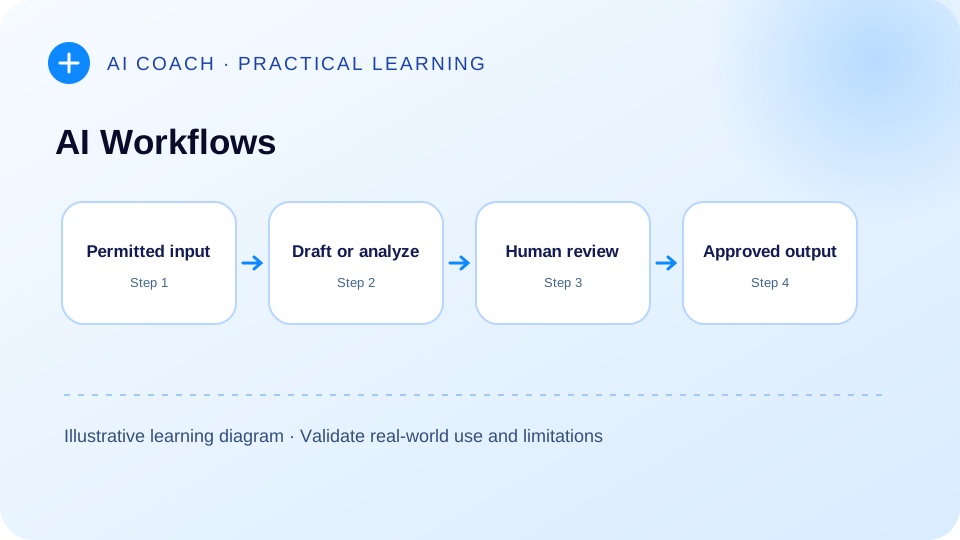
Editorial approach: this is an educational explanation using illustrative exercises, not a record of a client deployment or a claim of tested commercial results. Check linked original sources before applying the methods to sensitive information.
An AI workflow is a defined sequence in which an AI component assists with a task, while people and conventional software establish the inputs, permissions, reviews and final actions. This guide helps professionals choose suitable tasks, design sensible checks and distinguish assistance from automation.
01. Strategic Opportunity: identify repetitive work carefully
Common office activities include summarizing self-authored notes, classifying incoming requests, formatting drafts and preparing outlines. These are hypothetical examples; no quantified productivity improvement is asserted. The useful question is not “Can AI touch this task?” but “Can the task be specified, verified and safely reversed if something goes wrong?” NIST's AI Risk Management Framework describes a structured approach to managing AI risks during design and use. NIST_RMF
A task with clear inputs, observable outputs and a human reviewer is usually easier to pilot than a task whose correctness is subjective or whose errors would be difficult to detect. Workflow design should begin with a written boundary around permitted data and downstream actions.
02. Learning outcomes: from task to controlled process
A professional should learn to define the trigger, inputs, model activity, output format, checks, owner and escalation point. These elements exist whether the workflow is manual, AI-assisted or partly automated. A single successful output is not sufficient evidence that a repeatable process is reliable.
Distinguish assistance from autonomy. In an assistive workflow, a person chooses the inputs and accepts or rejects the result. In a partly automated workflow, software may transfer outputs between approved tools, but checks can pause or reject a step. A higher-autonomy system may decide which tool or step to use next; that introduces additional permissions and monitoring requirements.
03. Practical learning route: one task, one controlled pilot
Illustrative scenario — internal meeting-note classification: A team wants to organize its own meeting notes into actions and unanswered questions. The workflow first checks that notes can lawfully be processed, then removes unnecessary personal information. The assistant extracts candidate actions and quotes a supporting line for each. A reviewer checks the list against the original note. Only accepted actions are then entered into a task system by an authorized person.
This is a hypothetical teaching example, not a deployed system. If action extraction accuracy cannot be checked, the workflow should not create real assignments automatically.
Proposed CTA: Explore Tools and Playbooks → /tools-playbooks/. No paid or unavailable program is implied.
04. Distinctive advantage: workflow suitability checklist
For each candidate task, assign low / medium / high concern in five dimensions: information sensitivity; error consequence; ability to verify the output; reversibility of downstream actions; and reliability of the underlying input. These are qualitative judgment categories, not an empirically validated score.
| Workflow example | Possible benefit | Required control |
|---|---|---|
| Rewrite approved internal text | Draft clarity | Meaning comparison |
| Extract tasks from a meeting | Structured list | Source-line checking |
| Classify support messages | Triage support | Routing audit and fallback |
| Suggest a response to a client | Draft assistance | Authorized review before sending |
| Change an external system | Operational action | Permissions, pre-action approval, audit log |
Prefer starting with activities where a human can inspect the result before it leaves the organization.
05. Credibility: risk controls belong inside the workflow
NIST's generative AI risk profile provides considerations specific to generative systems, complementing its broader AI Risk Management Framework. The publication supports thinking systematically about risk; it does not certify any particular workflow or software provider. NIST NIST_RMF
Keep three records: a workflow specification naming responsibilities, a test log capturing sample outcomes, and an incident register for incorrect or unsafe behavior. Use representative examples rather than only idealized inputs. A successful pilot should lead to additional testing and governance, not instant organization-wide rollout.
06. Experience: map, pilot, evaluate, adjust
First, map the existing non-AI process as a sequence of steps. Second, identify exactly one step where AI assistance might help. Third, define a small sample set, expected results and unacceptable failure conditions. Fourth, test with permissible inputs, reviewing each output. Fifth, adjust instructions, checks or boundaries and retest.
Original process map: Request received → data-permission check → AI draft/classification → evidence comparison → human acceptance/rejection → authorized downstream action → log outcome. Any rejected output moves to human handling; it should not quietly progress through the process.
Document whether the process is genuinely repeated and whether operating costs, access conditions or privacy rules change over time. No automation design should bypass the team's established approvals.
Detailed pilot example: from request to approved action
Consider a hypothetical team preparing internal weekly project summaries. First, determine which notes are permitted to enter the chosen system. Second, list expected fields—completed work, unresolved items, owner, next step, and supporting excerpt. Third, draft a template using a small collection of fictional notes that include ambiguous ownership and contradictory dates. Fourth, require the AI draft to quote the evidence it used. Fifth, ask a human owner to accept, amend or reject each row before any distribution.
The acceptance checklist should include: no invented owner; no reclassification of tentative decisions as confirmed; all dates transcribed faithfully; clearly marked missing information; no leakage of restricted information; and an explicit statement of who approved the final summary. Requiring a reviewer does not eliminate error, but it creates a point of accountability and a record of corrections.
A practical team can test different categories of errors: omission, wrong attribution, unsupported synthesis, date mismatch, inappropriate disclosure and failure to follow an escalation rule. Keep a log of the number and type of observed deviations for the pilot's actual sample. Do not extrapolate a small controlled demonstration to a claim about organization-wide performance.
Governance ownership matrix
| Responsibility | Owner to designate | Evidence to retain |
|---|---|---|
| Input permission | Data/process owner | Approved data categories |
| Workflow configuration | Authorized implementer | Current specification and version |
| Output verification | Named reviewer | Accepted/rejected examples |
| Action execution | Authorized operator | Decision and action log |
| Incident response | Designated accountable party | Escalations and remediation |
The labels identify functions, not a prescribed organizational chart. A small team may combine roles where appropriate, provided authorization and accountability remain clear. Do not infer that a tool's technical capability grants the team permission to use it with any particular dataset.
When a workflow deserves expansion
A pilot warrants further consideration only when reviewers can explain its task boundaries, evidence criteria, failure modes and recovery procedure. Review whether it is useful across representative inputs, whether its integration permissions remain appropriate, and whether a simpler non-AI alternative might do the job with fewer risks. If the model's output is not meaningfully better suited to the task than a conventional template, stop or redesign the pilot. The objective is a reliable work process, not AI adoption for its own sake.
07. Decision accelerator: when not to automate
If an input is highly sensitive, the required action is irreversible, a reviewer cannot distinguish correct from incorrect results, or error consequences are high, avoid direct automation until controls have been established. Even where an AI interface seems reliable, connected applications create additional risks: unwanted data sharing, tool misuse and misleading instructions inside external content. OWASP's prompt-injection guidance explains why externally supplied content should be treated as untrusted input. OWASP
What is the difference between a workflow and an agent? A workflow can follow predefined routing and approval conditions. An agent can dynamically select tool calls or intermediate steps. The latter is not automatically preferable. Can a pilot prove broad reliability? No; pilot findings are limited to the sample and conditions tested. Who owns the final output? Assign a human accountable for review and action.
08. Strategic conversion: continue with practical resources
Begin with one low-risk process, document it, and evaluate whether AI genuinely helps its most time-consuming step without weakening oversight. Continue to the site's tools and playbooks hub. Explore Tools and Playbooks → /tools-playbooks/ (proposed CTA; requires confirmation before build).
Primary sources for fact-check and attribution
- NIST: https://www.nist.gov/publications/artificial-intelligence-risk-management-framework-generative-artificial-intelligence
- NIST_RMF: https://www.nist.gov/itl/ai-risk-management-framework
- OWASP: https://genai.owasp.org/llmrisk/llm01-prompt-injection/
Continue your learning pathway
Review the foundational guide and connect this topic to the relevant learning resources.
Explore tools and playbooks